Why does Redeem do nothing?
Tutorial not finished, wrong Place, extra spaces, two codes in one box, or an Expired row.

How to redeem Build and Kill Zombies codes: finish tutorial, open Shop, COMMUNITY CODES box, paste once, Redeem. Place 105011592530400. Verified Sep 2026.
Shop path for COMMUNITY CODES.
~5 min read
How to redeem Build and Kill Zombies codes: finish the tutorial on Place 105011592530400, open Shop (left HUD icon or the shop stall), scroll to COMMUNITY CODES or the bottom box, paste one Working string, tap Redeem. Last checked September 15, 2026. Verified September 15, 2026. Not Build a Car to Kill Zombies (Place 117856377735280).
| Fact | Detail |
|---|---|
| Place | 105011592530400 |
| Entry | Left Shop icon or shop stall |
| Box label | COMMUNITY CODES (or bottom text box) |
| Alt recap path | SHOP → EXCLUSIVE SHOP → COMMUNITY CODES |
| Paste rule | One string, case-sensitive, Copy button |
| Working strings | COMMUNITY, CashDrop, MOREFRIENDS, HACKER, 1x1x1x1 |
| Wrong title | Build a Car to Kill Zombies · 117856377735280 |
New joins get a short onboarding before Shop will treat a paste as a real Redeem. If you skip straight to a copied Build and Kill Zombies codes string and nothing happens, you are usually still in tutorial lock — not holding an expired toast.
Finish the prompts until you can walk the base, see roll machines, and open HUD icons. Then Shop is in play. This wiki does not publish a second-by-second tutorial script; follow the live prompts, then come back to this path.
Confirm the Roblox join is Place 105011592530400. Redeem UI from Build a Car to Kill Zombies will not match these labels. If you landed on 117856377735280, leave and search the listing titled Build and Kill Zombies.
Once the tutorial is done, the next bottleneck is actually finding Shop — recaps disagree on icon versus stall, which is the next section.
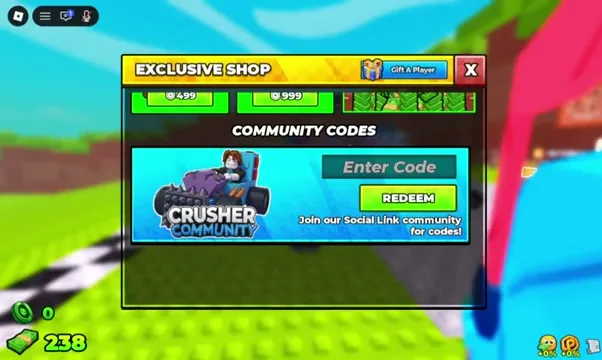
Two documented entries exist. One: the left HUD icon. Two: the shop stall in the base. Open either, then scroll until you see COMMUNITY CODES or a text box at the bottom of the shop window.
Do not hunt a Steam overlay, a browser extension, or a chat command. How to redeem Build and Kill Zombies codes is an in-experience Shop action.

Exclusive packs and luck purchases sit above or beside the codes box on some HUDs. If you only see Robux rows, keep scrolling. The codes field is easy to miss when you stop at Tiny Pack.
If your labels say EXCLUSIVE SHOP before COMMUNITY CODES, that is the other documented path — covered next — not a different game.
One recap writes the click path as SHOP → EXCLUSIVE SHOP → COMMUNITY CODES. Another writes “enter the shop hut and scroll to the bottom of the shop window.” Both are treated as valid until a screenshot proves one HUD version.
Follow whichever labels you actually see. Live HUD wins over this page. If neither Exclusive Shop nor a bottom box exists, you are on the wrong Place or mid-tutorial.
| If you see | Do this |
|---|---|
| Left Shop icon | Open it, scroll for COMMUNITY CODES |
| Shop stall / hut | Enter, scroll the window to the bottom box |
| EXCLUSIVE SHOP tab | Open it, then COMMUNITY CODES |
| Only Robux packs | Keep scrolling; codes sit lower |
| No Shop at all | Finish tutorial; confirm Place ID |
Exclusive Shop Robux packs are not Redeem. Buying Tiny Pack does not consume COMMUNITY. Codes stay in the text box. Packs stay on the paid list.
With the box on screen, paste technique is the remaining failure point.
Use this checklist once per string. It is not a repeat of At A Glance — it is the executable order at the box.
If you need a first engine and tank, Redeem COMMUNITY first. CashDrop is extra cash. MOREFRIENDS is seats. HACKER then 1x1x1x1 if you want tokens. Skipping COMMUNITY to mash token codes first is allowed; it is just a slower first car.
A failed toast still has a short diagnostic list — that is the next section, not “spam Redeem”.
If COMMUNITY succeeds, go build immediately: the small engine and small tank only help on the chassis. Standing in Shop to Redeem five strings is fine; standing in Shop instead of driving is not. How to redeem Build and Kill Zombies codes is a means to a first loop, not a daily login minigame.
Matched by build plan, shared topics, and guide progression — not random related links.
Match the toast (or the lack of a toast) to one cause. Do not invent a sixth Active code to “fix” a fail.
| What you see | Likely cause | Fix |
|---|---|---|
| Nothing happens | Tutorial lock or wrong field | Finish tutorial; click the codes box |
| Invalid / expired | Expired row or typo | Use Active table; Copy, do not retype |
| Already redeemed | This account used it | Stop; try the next Working string |
| Wrong game | Place 117856377735280 | Leave; join 105011592530400 |
| HACKER paid 50 not 150 | Expected on this wiki | Redeem 1x1x1x1 for 150 tokens |
Cash and parts from COMMUNITY only help if you roll and build. Seats do not add fuel. Tokens do not auto-buy Luck I. Go spend on the beginner loop or skills.
If you still need a fresh string, the Codes channel on Discord is the documented drop, not a comment section.
Next: copy a Working row from the codes table and paste it once in Shop. If Redeem still fails, check Discord for a rotated string, then drive a first car in the beginner guide.
Tutorial not finished, wrong Place, extra spaces, two codes in one box, or an Expired row.
That is one recap. The other is stall + bottom box. Follow live HUD labels.
Yes. Use Copy from the codes page.
Shop is in-experience. Mobile glyphs are TBA; the same COMMUNITY CODES box is the target.
Matched by build plan, shared topics, and guide progression — not random related links.