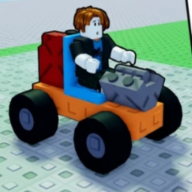
Is Q always delete?
No. Q is category or delete depending on mode. Check the live prompt.

Build and Kill Zombies controls: WASD, Space jump, E interact, B build, F drive, Q category or delete, R rotate, X cancel. Live HUD wins. Verified Sep 2026.
PC keys and drive mode in How to Play footage.
~5 min read
Build and Kill Zombies controls on PC (community HUD reference) for Place 105011592530400. Live UI always wins if a patch remaps a key. Verified September 15, 2026. Not Build a Car to Kill Zombies (Place 117856377735280).
| Fact | Detail |
|---|---|
| Move | W A S D |
| Jump | Space |
| Interact / roll | E |
| Build menu | B (some recaps also mention P for parts) |
| Drive / return | F or green DRIVE |
| Category / delete | Q — mode-dependent |
| Rotate / cancel | R / X |
| Place | Mouse |
At base you are on foot. WASD moves, Space jumps, E interacts with machines, stalls, and prompts. This is the same walk set most Roblox experiences use; the unique Build and Kill Zombies controls start when you touch a roll machine or press B.
Walk to CAR PARTS and SUPPORTS first, not to green DRIVE. A drive with an empty chassis is a wasted F. Shop (codes) is a stall or left icon — also E / click, not a key this wiki will invent.
If the HUD says Interact, press E. If it says Drive, you are already on the vehicle path. Mixing those two is the classic first-hour misclick.
Once you can walk the base without falling off the pad, build-mode keys are the next layer.
B opens Build. Some recaps mention P for parts/customization — if your HUD shows P, use P; this wiki will not pretend both always exist. In Build: mouse places, R rotates, X cancels. VEHICLE vs WEAPONS tabs are clicks, not extra keys.
Weapons go on the front face per recaps. Rotate the ghost with R until the mount points down the road, then click. A sideways shredder is a controls problem, not a “bad part.” If the WEAPONS tab is empty, you are on the wrong machine — SUPPORTS rolls mounts, CAR PARTS rolls the car.
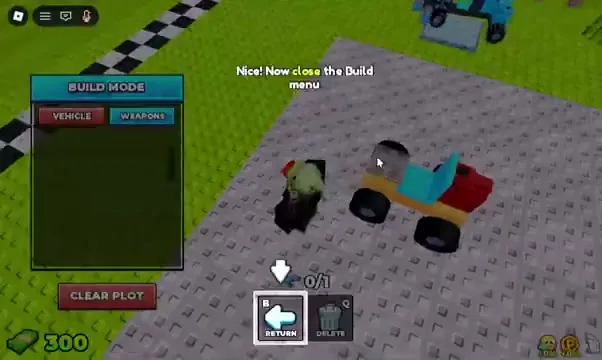
At the roll machine, Q is category. In Build, Q may delete. The live prompt is the spec. If you deleted a wheel, undo by placing another — this wiki does not document a secret undo key.
Roll keys are their own short list because players mash E in Build and wonder why nothing rolls.
Stand at the machine. Q cycles or selects category (Blocks, Engines, Wheels, Fuels on CAR PARTS; weapons/supports on SUPPORTS). Confirm the category, then E to roll. Cash is spent per roll — exact prices per rarity are TBA except named examples on the parts page.
You cannot roll from the road. F into a wave does not open the machine. Return first.
Recaps mention dedicated roll stations (Crossbow, Glass Cylinder). Those still use interact/E. They are not a second control scheme.
When the chassis is bolted, driving keys take over. That is the next section.
F or green DRIVE starts the run. On the road, W accelerates, S reverses, A/D steer. Jump/Space on foot does not become a documented nitro. You ram zombies or steer around gaps — both are legal.
F again returns to base when the game offers return. Fuel 0 also returns you. Those are the two documented end conditions besides a disconnect.

At base with a built car, F is go. On the road, F is come back (when the prompt says so). Do not tap F during Build placement or you may leave a half car on the pad.
The decision table next is for overlapping prompts — the mid-page executable block.
Match HUD text, not memory. This table is not the glance key list restated — it is conflict resolution.
| Situation | Press | Do not |
|---|---|---|
| Machine prompt: category | Q then confirm, E to roll | Q-delete a chassis piece |
| Build ghost looks wrong | R rotate or X cancel | F drive with a floating part |
| Green DRIVE showing, car complete | F | B again unless you still need a wheel |
| On the road, fuel remaining, want to shop | F to return when offered | Assume E opens Shop mid-wave |
| Q label says delete | Only if you mean to delete | Category change |
| P appears on HUD | Use P for that panel | Invent P if the HUD has no P |
Bolt a cheap Common car and drive once just to feel W/A/S/D. Then rebuild. The beginner guide is the loop; this page is the keys.
Matched by build plan, shared topics, and guide progression — not random related links.
Mobile glyphs are TBA until a capture exists. Expect on-screen equivalents for move, interact, build, and drive — not a PC-only game, but this wiki will not fake a button map. If you are on touch, follow the on-screen labels the same way PC players follow the prompt.
Touch still uses the same loop: roll, build, F/DRIVE, return on empty fuel. Codes still Redeem in Shop. If a mobile prompt uses a thumb button where PC uses B or F, that thumb button is the control — this page will not assign a fake letter.
Build and Kill Zombies controls on a laptop touchpad: click-to-place in Build is easier if you rotate with R before the click. Dragging a ghost off the chassis and hitting F is how people drive a car with a floating wheel. Cancel with X, then F.
Knowing B and F is useless until parts sit on the chassis. Next page is the first working car, then named blueprints.
Next: bolt a first chassis and drive using the beginner guide, then pick a car build bias. Parts keys stay on this page; part names live on parts.
No. Q is category or delete depending on mode. Check the live prompt.
Only if your HUD shows P. Recaps mention it; live UI wins.
F starts a drive at base and returns when the return prompt is up. Fuel 0 also returns you.
No. Place 117856377735280 is a different title.
Matched by build plan, shared topics, and guide progression — not random related links.